
OpenAPI: Management API Access and AI Agents
fn-knock's Rust management backend provides OpenAPI 3.1 documentation for reviewing management endpoints, generating client code, and connecting automation tools. This guide assumes that the management backend listens on 127.0.0.1:7998 and uses fn-knock's own Protocol mapping to make the documentation available at knock.example.com:7999.
The management API can change mappings, certificates, DDNS, WAF, and other system settings. Do not expose it like an ordinary public web page. Enable Protocol mapping authentication and combine it with a fixed source IP, VPN, or another network access restriction.
Documentation Endpoints
| Address | Content |
|---|---|
http://127.0.0.1:7998/docs | Interactive Swagger UI |
http://127.0.0.1:7998/docs/json | OpenAPI 3.1 JSON |
http://knock.example.com:7999/docs | External documentation endpoint after completing the mapping below |
The example assumes that the current instance's management backend uses port 7998. OpenWrt uses 17998 by default. If you customized the port, use the actual deployment setting. Before creating an external mapping, open the local /docs endpoint on the fn-knock host and confirm that the backend port and documentation are available.
Publish the Documentation with a Protocol Mapping
Protocol mappings forward by TCP/UDP and port, not by domain. knock.example.com only needs to resolve to fn-knock's public entry IP. The external TCP port 7999 identifies this route.
Browser
  -> http://knock.example.com:7999/docs
  -> Router or cloud firewall allows TCP 7999
  -> fn-knock Protocol mapping TCP :7999
  -> 127.0.0.1:7998
  -> Swagger UI
Open
System settings → Modeand confirm that the current mode isSubdomain mode.Enable
Protocol mappingunderSystem settings → Features.Open
Protocol mappingsand add this rule:Field Example Transport protocol TCPExternal port 7999Comment fn-knock OpenAPITarget address 127.0.0.1:7998Require auth Enabled Configure the router to forward public TCP
7999to TCP7999on the fn-knock host. On a cloud server, allow the same port in its security group. Docker deployments must explicitly publish the port in the container startup configuration.If
Require authis enabled, sign in to fn-knock from the same public egress IP and make surePost-login IP authorizationis not disabled. You can instead add a manual IP/CIDR grant for a fixed source.Open
http://knock.example.com:7999/docs. Backend port7998serves HTTP by default. Do not change this example directly tohttps://unless you have separately configured TLS termination in front of it.
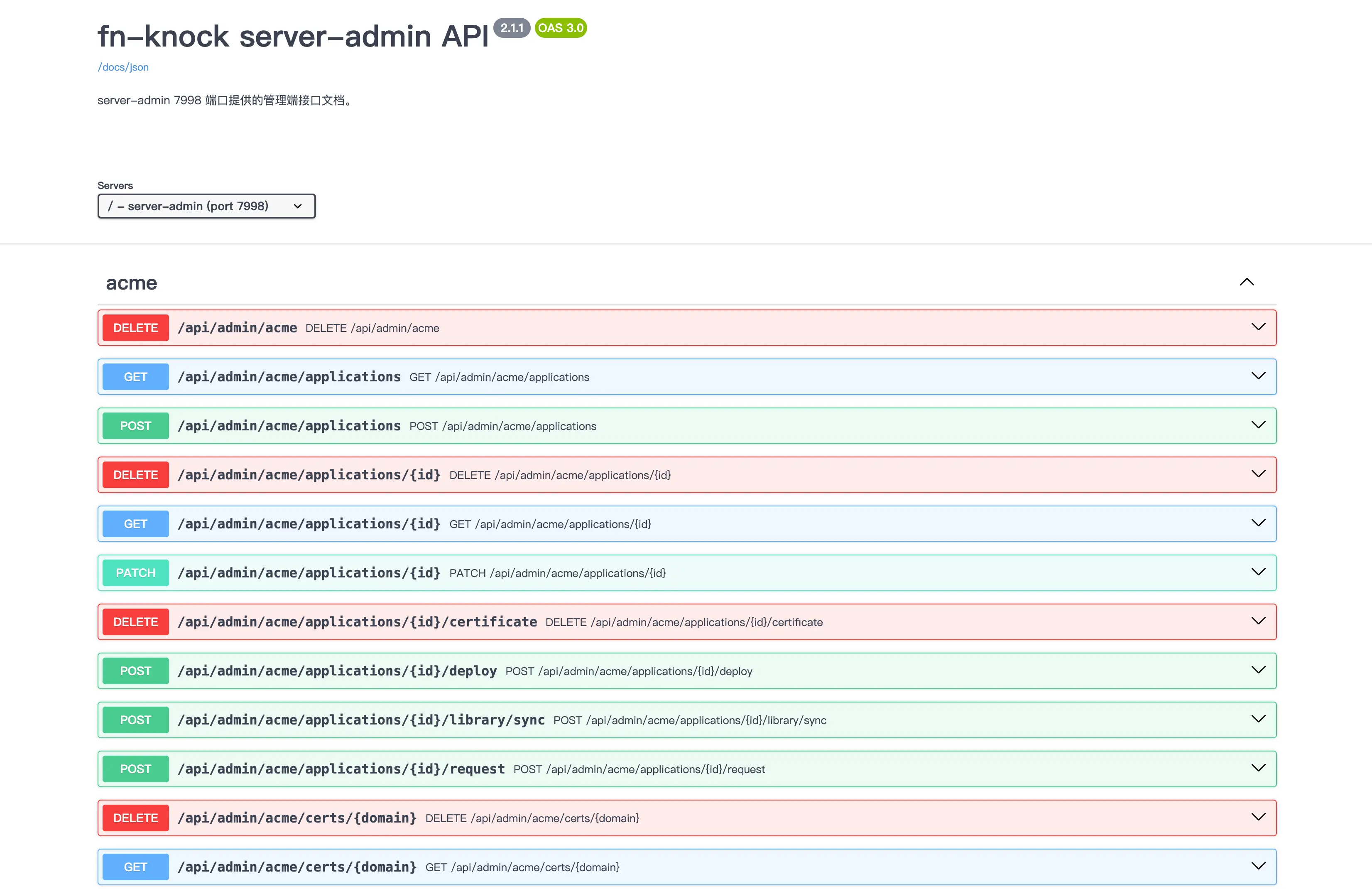
Swagger UI's scripts, styles, and icons are bundled into fn-knock and served locally under /docs/assets/; it does not depend on jsDelivr, unpkg, or another public CDN. As long as the management backend and /docs/json are reachable, the complete documentation works offline or where frontend CDNs are blocked. An unknown asset path returns 404.
The OpenAPI contract provides Simplified Chinese category descriptions, operation summaries, behavioral boundaries, and response descriptions for every management operation. Selected complex operations also include request and response examples and Schema field documentation. The same material appears in Swagger UI and /docs/json, so code generators and AI Agents can read it. Paths, methods, and field names remain in their original code form.
The contract's explanatory text does not follow the admin console language and is currently provided in Simplified Chinese. Read both the operation description and its Schema before calling it; do not infer the side effects of a write operation from its name alone.
A 403 Response or Connection Failure
403 Forbidden: some Docker, Linux, OpenWrt, and Windows deployments require requests to enter through the protected management endpoint. Direct access to the internal backend is rejected. Keep that protection in place; do not forge an internal proxy header or bypass the management panel.- Immediate disconnect: check Protocol mapping authentication, the current source-IP grant, and the credential's service scope.
- Connection timeout: check DNS, router port forwarding, cloud security groups, Docker port publishing, and the host firewall in that order.
- Local access works but external access fails: confirm that the router forwards to fn-knock's External port
7999, not the internal Target port7998.
See TCP/UDP Stream Proxying for complete platform boundaries and troubleshooting.
Download the OpenAPI File
Save the OpenAPI JSON locally before giving it to a code generator, API client, or AI Agent:
curl --fail \
  http://knock.example.com:7999/docs/json \
  -o fn-knock-openapi.json
The contract is generated from the management routes that are actually registered and provides schemas for request bodies, responses, path parameters, and the main error structures. Build and test checks verify that every documented path and method exists. The contract changes with fn-knock releases, so when generating a client, retain both the instance's /docs/json and its version number; do not apply an old schema unchanged to a newer or older release. Even with complete types, generated code still needs validation against a test instance. Start with read-only GET endpoints before wrapping write operations.
Ask an AI Agent to Build an Integration
An AI Agent that can read a URL or local file can inspect /docs/json and then generate Python, TypeScript, Go, or Shell code for the required task. For example:
Read http://knock.example.com:7999/docs/json
and generate a TypeScript client:
1. Implement read-only endpoints; do not call POST, PATCH, PUT, or DELETE.
2. Handle the fn-knock response envelope and non-2xx errors consistently.
3. Read the base URL from the FN_KNOCK_API_BASE environment variable.
4. Generate types, timeouts, and tests for every function.
5. Never write Cookies, passwords, or Tokens into source code or logs.
For configuration changes, include the operation scope, target resource, and confirmation workflow in the prompt. For example, require the Agent to read current state, print a change preview, and wait for human confirmation before invoking a write endpoint. If the OpenAPI document does not describe a request body, provide a redacted request sample from the browser's developer tools so the Agent can model the actual fields.
Review at least the following before using generated code:
- The base address points to the intended instance.
- Requests carry the management session or authentication required by that deployment.
- Requests have timeouts and handle unsuccessful responses.
- Write operations include idempotency, backup, or human confirmation.
- Logs do not expose Cookies, credentials, certificate private keys, or internal addresses.
Security Boundary
Prefer access through a VPN, fixed egress IP, or temporary port mapping. Long-term exposure to the entire internet is not recommended.
Enable
Require authon the Protocol mapping. Disable the feature or delete the rule when testing is finished and it is no longer needed./docsis an interface reference, not a safety layer for dangerous write operations. Swagger UI'sTry it outsends real requests to the current instance./docs/jsonexposes the management endpoint inventory and should also be treated as part of the management plane.Export a backup before making changes. Test certificate, WAF, DDNS, mapping, and maintenance write endpoints in a non-production environment.